# Metafields
URL: https://docs.sparklayer.io/developers/data/metafields
Every SparkLayer product, customer and order metafield key and type, such as pack_size, rrp, price_lists and payment_on_account, and how to auto-configure them.
Metafields store extra information that your eCommerce platform doesn't usually capture. SparkLayer uses them for additional B2B data:
| Type | Used for |
| --- | --- |
| **Product metafields** | Configuring the [frontend interfaces](https://docs.sparklayer.io/help/storefront/interfaces.md), such as [pack sizes](https://docs.sparklayer.io/help/storefront/quantity-rules.md) and [RRP prices](https://docs.sparklayer.io/help/pricing/pricing-display.md) |
| **Customer metafields** | Adding customer information, such as [credit limits](https://docs.sparklayer.io/help/ordering/credit-net-terms-and-invoicing.md) |
| **Order metafields** | Adding [invoicing information](https://docs.sparklayer.io/help/ordering/credit-net-terms-and-invoicing.md) to an order, and importing order history |
This page lists every metafield SparkLayer supports. On Shopify, each one uses the namespace `sparklayer`, for example `sparklayer.pack_size`. For setting them up on your platform, see:
- [Shopify metafields and data mapping](https://docs.sparklayer.io/help/platforms/shopify/metafields.md)
- [BigCommerce metafields and data mapping](https://docs.sparklayer.io/help/platforms/bigcommerce/metafields.md)
## Automatically configure metafields
On Shopify, SparkLayer can create its metafield definitions for you.
1. In the [SparkLayer Dashboard](https://app.sparklayer.io/configuration/integrations/platform), go to **Integrations > Platform connection**.
2. In the **Configure metafields** section, click **Configure**. You'll see every metafield that can be configured for **Product** and **Customer** data.
Each metafield you enable is added to [Custom data](https://admin.shopify.com/settings/custom_data) in your Shopify admin and pinned, so it's easy to find when you edit products or customers.
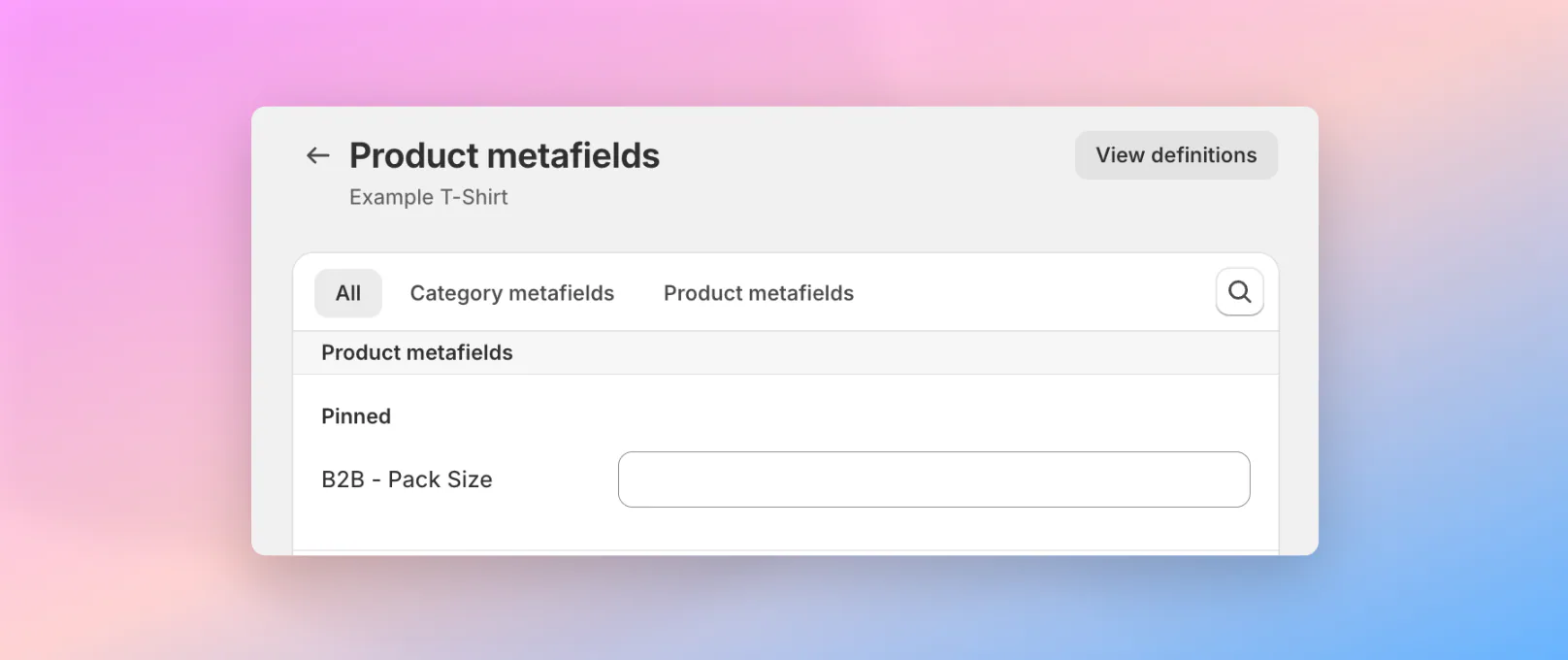
Metafields created this way are named `B2B - [name]`, for example `B2B - Pack Size`. To change or remove them, use [Custom data](https://admin.shopify.com/settings/custom_data) in your Shopify admin.
## Product metafields
Apply all product metafields at the variant level.
| Metafield | Key | Type |
| --- | --- | --- |
| **Recommended retail price (RRP).** Sets an RRP ("MSRP") price for a variant. See [pricing display](https://docs.sparklayer.io/help/pricing/pricing-display.md). | `rrp` | `json` |
| **Pack size.** Sets pack size rules for products, such as 6, 12 or 18. See [quantity rules](https://docs.sparklayer.io/help/storefront/quantity-rules.md). | `pack_size` | `integer` |
| **Minimum purchasable quantity (variant level).** The minimum quantity of the variant customers must buy. See [quantity rules](https://docs.sparklayer.io/help/storefront/quantity-rules.md). | `min_order_quantity` | `integer` |
| **Maximum purchasable quantity (variant level).** The maximum quantity of the variant customers can buy. See [quantity rules](https://docs.sparklayer.io/help/storefront/quantity-rules.md). | `max_order_quantity` | `integer` |
| **Minimum purchasable quantity (product level).** The minimum quantity customers must buy across all variants. See [quantity rules](https://docs.sparklayer.io/help/storefront/quantity-rules.md). | `min_order_parent_quantity` | `integer` |
| **Maximum purchasable quantity (product level).** The maximum quantity customers can buy across all variants. See [quantity rules](https://docs.sparklayer.io/help/storefront/quantity-rules.md). | `max_order_parent_quantity` | `integer` |
| **Reserve stock.** Reserves an amount of stock that isn't available for regular purchase, for example to hold inventory for specific customers, events or direct-to-consumer sales. See [stock display](https://docs.sparklayer.io/help/storefront/stock-display.md). | `reserve_stock_quantity` | `integer` |
| **Product visibility.** Whether a variant is visible on the storefront. If disabled, customers don't see the variant, even if it can still be bought in other ways. See [product display](https://docs.sparklayer.io/help/storefront/product-display.md). | `display` | `boolean` |
| **Purchasing.** Whether a variant can be added to the cart and bought. When disabled, the product stays visible but can't be bought, for example to showcase upcoming or unavailable items. See [product display](https://docs.sparklayer.io/help/storefront/product-display.md). | `sell` | `boolean` |
| **Customer group product rules.** B2B product rules, such as pack size and orderable quantities, for specific customer groups. Overrides the metafields above. See [product settings](https://docs.sparklayer.io/help/storefront/product-settings.md). | `settings` | `json` |
| **Reserved DTC stock quantity.** A stock quantity to reserve for your direct-to-consumer (DTC) customers. See [stock display](https://docs.sparklayer.io/help/storefront/stock-display.md). | `min_stock_level` | `integer` |
| **Restock date.** The date a product in pre-order status is expected to be available. See [stock display](https://docs.sparklayer.io/help/storefront/stock-display.md). | `restock_date` | `date` |
| **Stock location settings.** B2B stock settings, such as minimum stock level and restock date, for specific stock locations. See [stock display](https://docs.sparklayer.io/help/storefront/stock-display.md). | `stock_location_data` | `json` |
You can also set customer-specific product rules: see [Product rules per customer group](https://docs.sparklayer.io/help/storefront/product-settings.md).
## Customer metafields
| Metafield | Key | Type |
| --- | --- | --- |
| **Customer title.** The customer's title (such as Mr, Ms or Dr), for personalising invoices, emails and account records. See [account and addresses](https://docs.sparklayer.io/help/customers/account-and-addresses.md). | `title` | `single line text` |
| **Company name.** The name of the customer's company. See [account and addresses](https://docs.sparklayer.io/help/customers/account-and-addresses.md). | `company_name` | `single line text` |
| **Assigned group.** The customer group assigned to the customer. Overrides any tags assigned to the customer. | `group` | `single line text` |
| **Customer-specific price lists.** The price lists assigned to the customer. Overrides any price lists assigned to the customer group. See [customer pricing](https://docs.sparklayer.io/help/pricing/customer-pricing.md). | `price_lists` | `json`
`single_line_text` |
| **Invoice payment.** JSON settings that define whether the customer can pay by invoice, so approved customers can complete purchases without paying straight away. See [credit, net terms and invoicing](https://docs.sparklayer.io/help/ordering/credit-net-terms-and-invoicing.md). | `payment_by_invoice` | `json` |
| **Credit limit and account balance.** The customer's credit limit and account balance. See [credit, net terms and invoicing](https://docs.sparklayer.io/help/ordering/credit-net-terms-and-invoicing.md). | `payment_on_account` | `json` |
| **Accounting ID.** A unique accounting ID for the customer. See [account and addresses](https://docs.sparklayer.io/help/customers/account-and-addresses.md). | `accounting_id` | `single line text` |
| **Additional percentage discount.** A flat discount percentage applied on top of other discounted pricing. See [customer pricing](https://docs.sparklayer.io/help/pricing/customer-pricing.md). | `discount_percentage` | `single line text`
`integer`
`float` |
| **Sales agent groups.** The sales agent groups assigned to the customer, so dedicated representatives can manage the account. See [restricting which customers a sales agent can see](https://docs.sparklayer.io/help/sales-reps.md#restrict-which-customers-a-sales-agent-can-see). | `sales_agent_groups` | `list.single_line_text` |
| **Parent account.** Links the customer to a parent customer account, for businesses with multi-level accounts, sub-customers and centralised purchasing. See [company users](https://docs.sparklayer.io/help/customers/company-users.md). | `parent_customer_id` | `single line text` |
| **Customer role.** The customer's role in their company, used to apply permissions. See [company users](https://docs.sparklayer.io/help/customers/company-users.md). | `role` | `single line text` |
| **Default shipping address ID.** The shipping address to use by default for orders. See [account and addresses](https://docs.sparklayer.io/help/customers/account-and-addresses.md). | `shipping_address_id` | `single line text` |
| **Default billing address ID.** The billing address to use by default for orders. See [account and addresses](https://docs.sparklayer.io/help/customers/account-and-addresses.md). | `billing_address_id` | `single line text` |
| **Available shipping addresses.** JSON listing every shipping address available to the customer, for businesses with several delivery locations. See [account and addresses](https://docs.sparklayer.io/help/customers/account-and-addresses.md). | `available_shipping_address_ids` | `json` |
To use the advanced metafields, [speak to our team](https://docs.sparklayer.io/help/support.md) about how they work.
## Order metafields
| Metafield | Key | Type |
| --- | --- | --- |
| **Invoice link.** A URL to the order's invoice, so customers can get to digital invoices quickly. See [credit, net terms and invoicing](https://docs.sparklayer.io/help/ordering/credit-net-terms-and-invoicing.md). | `invoice_url` | `url`
`list.url`
`file_reference`
`list.file_reference` |
| **Order import.** Set to `true` to import a historic order into SparkLayer, so customers see it in their order history. See [importing order history](https://docs.sparklayer.io/help/platforms/shopify/metafields.md#import-order-history-into-sparklayer). | `order_import` | `boolean` |
| **Visible ID.** A custom order ID shown instead of the platform's order number, for example your ERP order number, so the ID is the same in every system. Shopify only. See [setting a custom order number](https://docs.sparklayer.io/help/platforms/shopify/metafields.md#set-a-custom-order-number). | `visible_id` | `single line text` |
## Next steps
- [Shopify metafields and data mapping](https://docs.sparklayer.io/help/platforms/shopify/metafields.md): set up and fill in metafields on Shopify.
- [Data limitations](https://docs.sparklayer.io/developers/data/data-limitations.md): limits on the data you send to SparkLayer.
- [Building integrations](https://docs.sparklayer.io/developers/building-integrations.md): how data flows between SparkLayer and your other systems.